Claude Code driving a browser is great right up to the moment it hits a login page, a CAPTCHA, or a button that says Pay. At that point you want to see exactly what it sees, and sometimes you want to take over. On the laptop where Chrome runs, a screenshot tool covers most of that. From a phone, over a tunnel, while the agent is mid-task, a screenshot every few seconds is not a view. It is a slideshow.
Ridealong is an open-source MCP server for Claude Code that drives a real Google Chrome and streams it to a web page you can watch, point at, pause, approve, or take over from your phone. This post is about the streaming half: how a Chrome tab ends up as H.264 in a <video> element on a phone, and the boring work that made it reliable. Everything below is read from the code; the numbers are the real defaults.
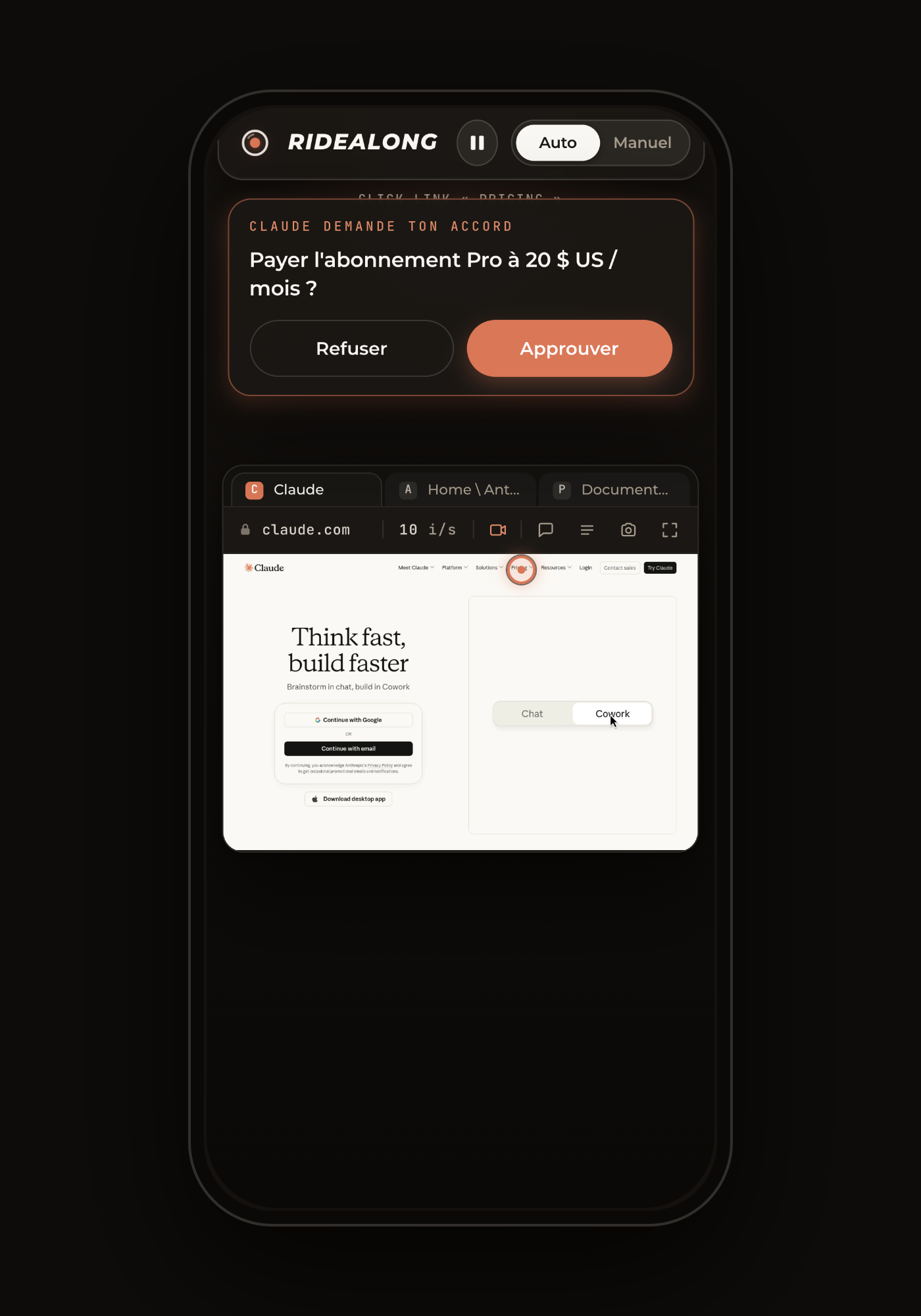
Why the JPEG screencast wasn't enough
The Chrome DevTools Protocol has Page.startScreencast. Give it a format, a quality and a maximum size, and Chrome sends you a JPEG every time the tab repaints. Ridealong's first live view was exactly that. Each viewer opens a websocket and reports how many physical pixels it can display (CSS size times devicePixelRatio); the server caps the screencast to that size, clamped between 320 and 4096 px, at JPEG quality 85. A phone gets a phone-sized stream, a retina desktop gets everything Chrome can render, and nobody pays for pixels they cannot see.
That path still exists, and it is the fallback. As the main path it has three problems. Every frame is a complete picture: no inter-frame compression, so a scroll is a burst of full JPEGs, and on a phone behind a tunnel the socket backs up and the picture stutters exactly when motion matters. Each viewer has its own screencast, so Chrome encodes once per viewer. And the frames travel as base64 inside JSON text messages, a third more bytes for nothing.
H.264 fixes the first problem by design: a P-frame on a page that did not change costs almost nothing, and a scroll is mostly motion vectors. A single encoder shared by every viewer fixes the second. Binary websocket frames fix the third.
The pipeline
The source is still the screencast. One screencast per Chrome, not per viewer, at the viewport size, JPEG quality 92, feeding the encoder. The obvious alternative on Linux is x11grab, but the screencast already follows the cast tab and its viewport exactly, no tab strip, no other window, and it costs nothing on a static page: Chrome emits no frame, ffmpeg gets no input.
ffmpeg reads stdin as MJPEG. The frames are written to the encoder's stdin with -f mjpeg -i pipe:0. Two flags do most of the work: -use_wallclock_as_timestamps 1 and -fps_mode passthrough. Timestamps are wall-clock and passed through, with no constant-frame-rate duplication, so a long static period produces no output instead of a burst of identical frames.
The encoder is whatever the host has. At startup Ridealong runs ffmpeg -encoders once and picks the first of h264_nvenc, h264_videotoolbox, libx264. On the NVIDIA path the settings are quality-first: preset p4, low-latency tune, VBR driven by a constant-quality target of 19 with spatial and temporal AQ, and zero-latency mode. Compared at 1080p against p1 with CBR, that is about 1.7 times the bytes on a worst-case test pattern and visibly sharper UI text. VideoToolbox runs in realtime mode; libx264 uses ultrafast and zerolatency. All three produce Constrained Baseline, no B-frames, a keyframe every two seconds. The target bitrate scales with the frame: 5 Mb/s at 1440x900, about 8 Mb/s at 1920x1080, maxrate 1.75 times that.
Output is fragmented MP4. -movflags frag_keyframe+empty_moov+default_base_moof with a fragment duration of 100 ms. An incremental box splitter reads ffmpeg's stdout: it collects ftyp and moov once as the init segment, then pairs each moof with its mdat into one media segment. Anything else at the top level is ignored.
On the wire, one byte of framing. Segments go out as binary websocket messages on the same socket that carries the JSON control traffic (mode, tabs, approval cards, pointer hints). The first byte says what it is: 0x01 for an init segment, 0x02 for a media segment. That is the whole protocol.
In the browser, Media Source Extensions. The page creates a MediaSource (or ManagedMediaSource on iOS Safari) with the codec string avc1.42E01E, Constrained Baseline 3.0, which every phone decodes in hardware. The SourceBuffer runs in sequence mode: a 0x01 message opens a fresh MediaSource, 0x02 messages are appended in order. Every 250 ms a loop checks how far playback sits behind the buffered end. In Auto it tolerates 0.9 s and nudges playbackRate to 1.1 past 0.6 s. In Manual every tap counts, so it speeds up past 0.18 s and jumps to live past 0.5 s. The buffer is trimmed behind the playhead so a long session does not grow memory.
Two details make this feel continuous. A late joiner needs an init segment and a keyframe; the cheap, correct answer is to restart the encoder when someone joins, coalesced over 150 ms, so everyone gets a fresh init and an IDR frame. And because Chrome only emits a frame when something changes, a still page would starve ffmpeg and stall MSE. So while idle the server re-feeds the last JPEG every 500 ms when nothing arrived for 450 ms, roughly 2 fps. With VBR these are identical P-frames and cost next to nothing.
The boring parts that made it reliable
Disconnects. Cloudflare's proxy drops a websocket that carries no bytes for about 100 seconds; measured through the tunnel it was a close code 1006 at 125 s. A static login page produces no screencast frames, so without help the live view "disconnected" every two minutes of you waiting. The server now sends a protocol-level ping every 30 seconds, a 3x margin. The browser answers pings itself, the page never sees them, and they carry no payload.
Reconnection. The link also drops for ordinary reasons: the phone locks, Safari goes to the background, the MCP server restarts. The page keeps the last frame on screen and reconnects on its own with a backoff that starts at 1 s and doubles up to 10 s, retrying immediately on visibilitychange and online. Only close code 1008, an invalid or expired token, is final.
A watchdog with a JPEG fallback. Four seconds after the socket opens on the video path, if the <video> element has not decoded anything (no init, or a codec the browser rejected), the page marks video as failed and reconnects on the JPEG path instead of showing black. If ffmpeg dies on the server (no encoder, GPU busy), viewers are told and do the same. A button flips between the two paths by hand.
Backpressure. If ffmpeg's stdin buffer passes 8 MB, the next frame is skipped rather than queued; the following one carries the same picture. A media segment cannot be skipped without breaking the decoder until the next keyframe, so a video viewer with more than 4 MB buffered is terminated and reconnects for a fresh init. On the JPEG path a viewer over 1 MB just loses a frame.
Tokens. A live link is exp.hmac: a unix expiry and HMAC-SHA256 over it, compared in constant time. The TTL is clamped between 30 s and 1 h, default 15 min, because a passkey login can take more than 5 min. The token travels in the URL fragment, so it never reaches the server or the Cloudflare access logs; the page scrubs it from history with replaceState and keeps it in sessionStorage so a reflex reload does not lock you out. Opening one valid link mints a 30-day device token, signed with a derived key and stored in localStorage, so the bare address works on that phone from then on. Control clients use a third derived key, so a viewer link can never act as one. Rotating the secret revokes everything.
One Chrome, one live view. Two Claude Code sessions on the same Chrome would fight for the port. Instead the second one hits EADDRINUSE and follows the first as a control client: it gets mode, pause and action pushes, announces its own actions, and asks approvals through the owner. When the owner goes away, the follower binds the port and promotes itself, so the links it handed out keep working.
Manual mode captures nothing. When you take the wheel, mouse, key and pinch messages are parsed only to strip the type field and hand the rest to Input.dispatchMouseEvent, Input.dispatchKeyEvent or Input.synthesizePinchGesture. Nothing is pushed to an array, nothing is logged, no property on the server accumulates keystrokes, and Claude's perception tools refuse to run while the view is in input mode. Because a static login page produces no frames, the mode switch is pushed to every viewer explicitly rather than riding on the next frame.
What's next
Adaptive bitrate for weak mobile links is the obvious gap: today the encoder targets one bitrate per resolution and the viewer copes. Session recording, the video plus the journal as chapters, is on the roadmap. And yes, WebRTC would shave latency; it would also mean a media stack in Node and a STUN/TURN story, where fragmented MP4 over a websocket the viewer already had was one process and one port.
Try it in Claude Code
One command on the machine Claude drives. Then ask Claude to open a site and give you the live view.